TOM
TOM
TOM is a mobile app designed for young adults to simplify the grocery shopping experience and manage food inventory with smart organization, reminders, and a playful, easy-to-use interface.
Role:
Full-stack Designer
Duration:
One Month
Type:
Interaction Design, User Research
Year:
2025


Young adults are learning to manage food as a part of growing up…
Existing tools are built for people with more time: they either lack a seamless flow across shopping, storing, and planning, or are overly function-driven and misaligned with real-life behaviors, making them confusing, outdated, and discouraging to use.
How might we help young adults turn the scattered chores of food management into a smooth and rewarding routine?
High-level goals that defined my design
Bridge what users buy, have, and need to support food planning habits.
Combine on-the-go convenience with a visually delightful interface.
Make it easy to save money and reduce food waste by giving users better visibility into their food.
Young adults are learning to manage food as a part of growing up…
Existing tools are built for people with more time: they either lack a seamless flow across shopping, storing, and planning, or are overly function-driven and misaligned with real-life behaviors, making them confusing, outdated, and discouraging to use.
How might we help young adults turn the scattered chores of food management into a smooth and rewarding routine?
High-level goals that defined my design
Bridge what users buy, have, and need to support food planning habits.
Combine on-the-go convenience with a visually delightful interface.
Make it easy to save money and reduce food waste by giving users better visibility into their food.
Young adults are learning to manage food as a part of growing up…
Existing tools are built for people with more time: they either lack a seamless flow across shopping, storing, and planning, or are overly function-driven and misaligned with real-life behaviors, making them confusing, outdated, and discouraging to use.
How might we help young adults turn the scattered chores of food management into a smooth and rewarding routine?
High-level goals that defined my design
Bridge what users buy, have, and need to support food planning habits.
Combine on-the-go convenience with a visually delightful interface.
Make it easy to save money and reduce food waste by giving users better visibility into their food.
Solution
TOM is an app that makes grocery shopping and food management simple and playful. The app features two main functions, Shop and Inventory.
Onboarding

First-time User Onboarding
On-the-go Grocery Lists

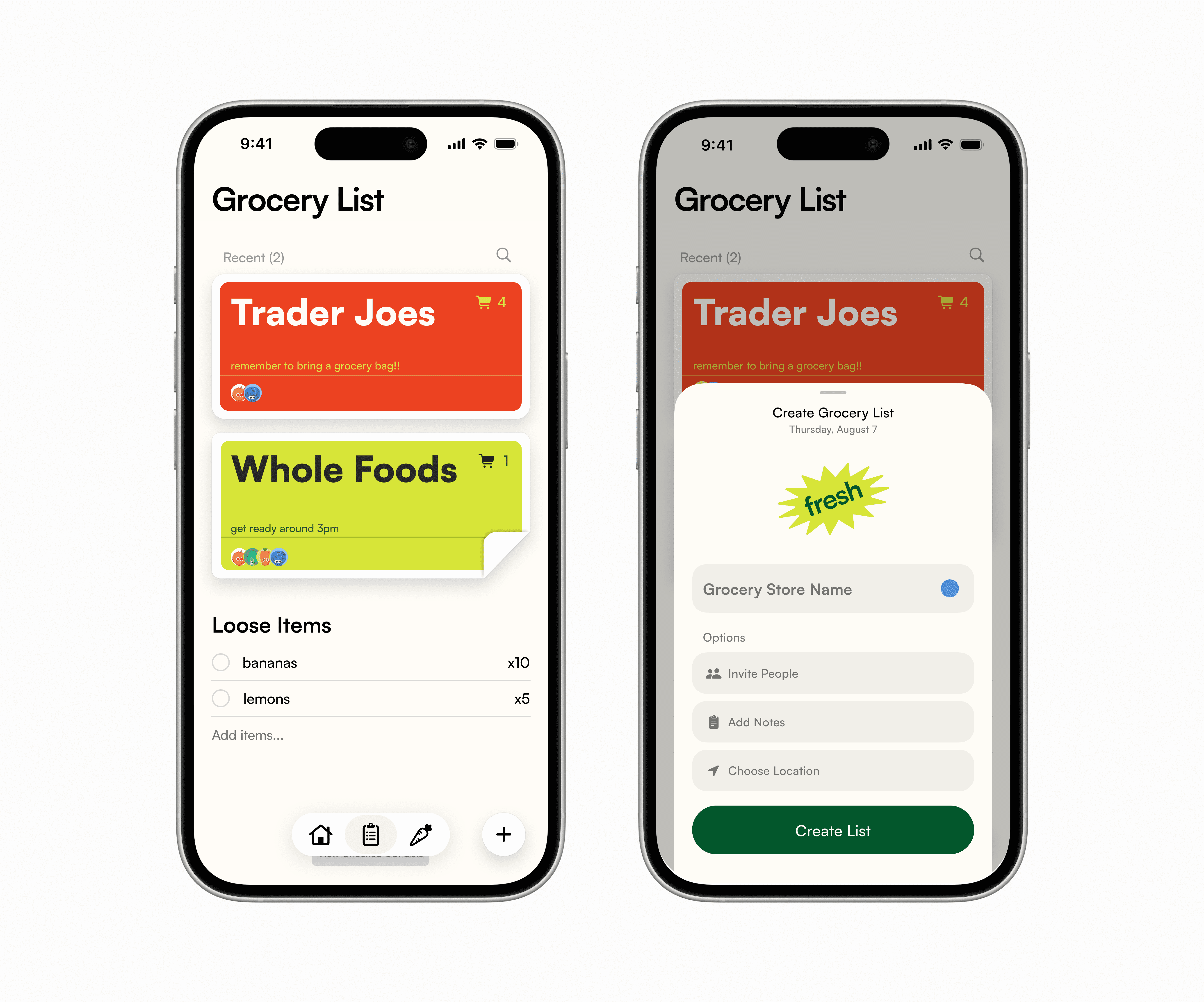
Tom integrates a shop view that allows users to create checklists sorted by grocery stores, share with friends to edit in real time, and check out once purchased.
Inventory

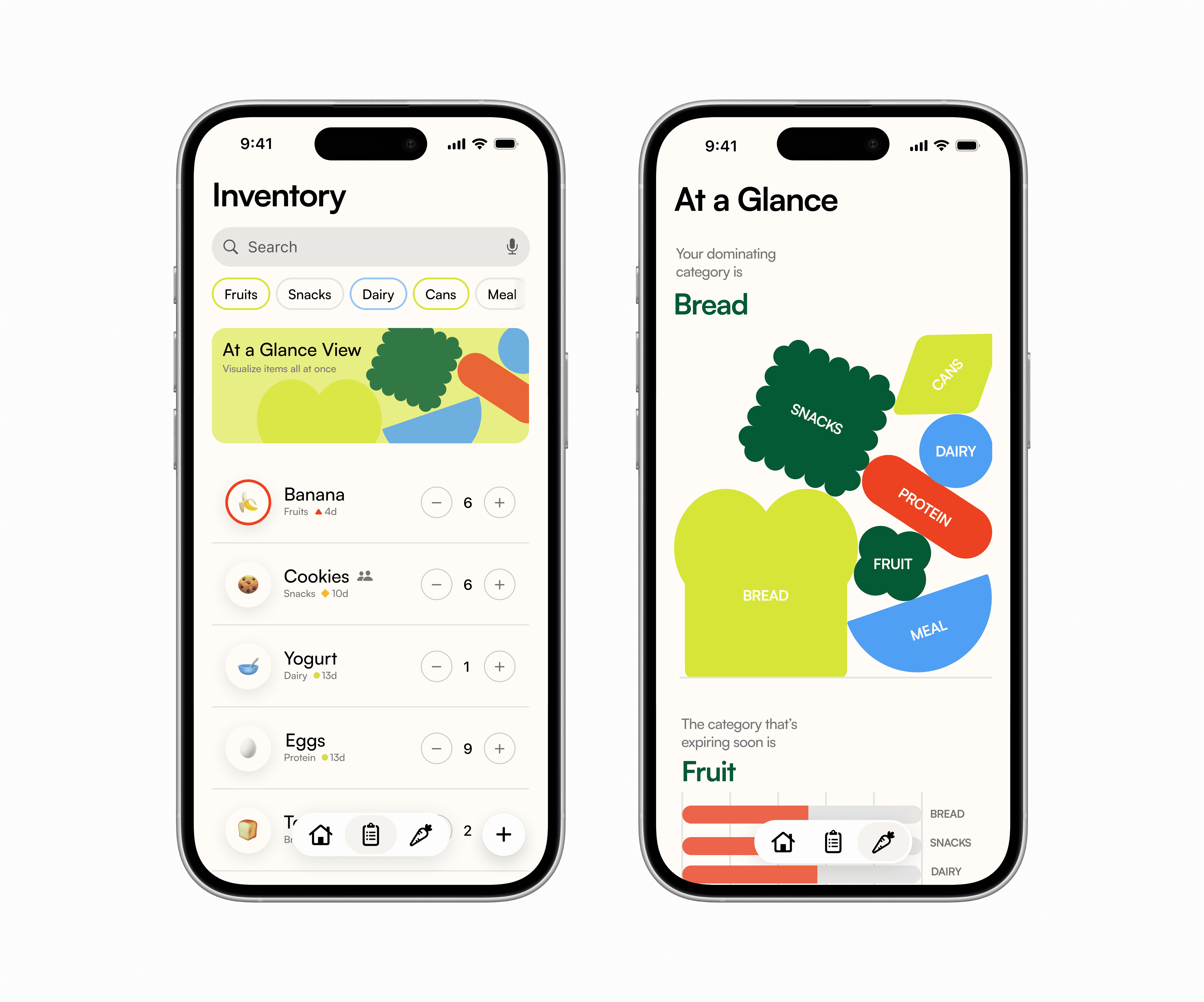
The built-in smart inventory system tracks what you already have, sends reminders before items expire.
At-a-glance Inventory
Inside the inventory view, TOM offers a dynamic overview mode for better visualization to prevent food waste.
Solution
TOM is an app that makes grocery shopping and food management simple and playful. The app features two main functions, Shop and Inventory.
Onboarding

First-time User Onboarding
On-the-go Grocery Lists

Tom integrates a shop view that allows users to create checklists sorted by grocery stores, share with friends to edit in real time, and check out once purchased.
Inventory

The built-in smart inventory system tracks what you already have, sends reminders before items expire.
At-a-glance Inventory
Inside the inventory view, TOM offers a dynamic overview mode for better visualization to prevent food waste.
Solution
TOM is an app that makes grocery shopping and food management simple and playful. The app features two main functions, Shop and Inventory.
Onboarding

First-time User Onboarding
On-the-go Grocery Lists

Tom integrates a shop view that allows users to create checklists sorted by grocery stores, share with friends to edit in real time, and check out once purchased.
Inventory

The built-in smart inventory system tracks what you already have, sends reminders before items expire.
At-a-glance Inventory
Inside the inventory view, TOM offers a dynamic overview mode for better visualization to prevent food waste.
Research
We conducted interviews and sent out a survey to 20 young adults (ages 20–30) across the U.S. to understand how young adults manage food (or don’t).
Through asking open-ended questions, we gathered information that addressed our users’ overarching lifestyles, food management + grocery shopping behaviors.
Patterns
With the majority of the participants expressing frustrations with food management, we decided to dive deeper to understand what’s preventing young adults from developing positive experiences.
70%
reported finding expired food at home “very often” or “sometimes.
> 50%
admitted to duplicate purchases & found the process frustrating
75%
relied on mental notes or nothing to track lists.
User Personas
With a clearer understanding of the problem, we summarized the characteristics into four distinct personas to help us better understand the users’ needs and motivations.


(The fictional characters are created based on data from real people, but adapted to our app’s color palette and mood)
Read more about user research and competitive analysis here.
Research
We conducted interviews and sent out a survey to 20 young adults (ages 20–30) across the U.S. to understand how young adults manage food (or don’t).
Through asking open-ended questions, we gathered information that addressed our users’ overarching lifestyles, food management + grocery shopping behaviors.
Patterns
With the majority of the participants expressing frustrations with food management, we decided to dive deeper to understand what’s preventing young adults from developing positive experiences.
70%
reported finding expired food at home “very often” or “sometimes.
> 50%
admitted to duplicate purchases & found the process frustrating
75%
relied on mental notes or nothing to track lists.
User Personas
With a clearer understanding of the problem, we summarized the characteristics into four distinct personas to help us better understand the users’ needs and motivations.


(The fictional characters are created based on data from real people, but adapted to our app’s color palette and mood)
Read more about user research and competitive analysis here.
Research
We conducted interviews and sent out a survey to 20 young adults (ages 20–30) across the U.S. to understand how young adults manage food (or don’t).
Through asking open-ended questions, we gathered information that addressed our users’ overarching lifestyles, food management + grocery shopping behaviors.
Patterns
With the majority of the participants expressing frustrations with food management, we decided to dive deeper to understand what’s preventing young adults from developing positive experiences.
70%
reported finding expired food at home “very often” or “sometimes.
> 50%
admitted to duplicate purchases & found the process frustrating
75%
relied on mental notes or nothing to track lists.
User Personas
With a clearer understanding of the problem, we summarized the characteristics into four distinct personas to help us better understand the users’ needs and motivations.


(The fictional characters are created based on data from real people, but adapted to our app’s color palette and mood)
Read more about user research and competitive analysis here.
Design Explorations
Shop List Visual Designs
The shop function started as my personal frustration with documenting loose grocery lists into the notes app every time I go shopping. Although it was quick, there was no way of organizing the items, which led to a collection of messy lists and loose items that often caused confusion.
My design principles for this section are:
Prioritize on-the-go usage
incorporating core organizational methods
Store Card Iterations
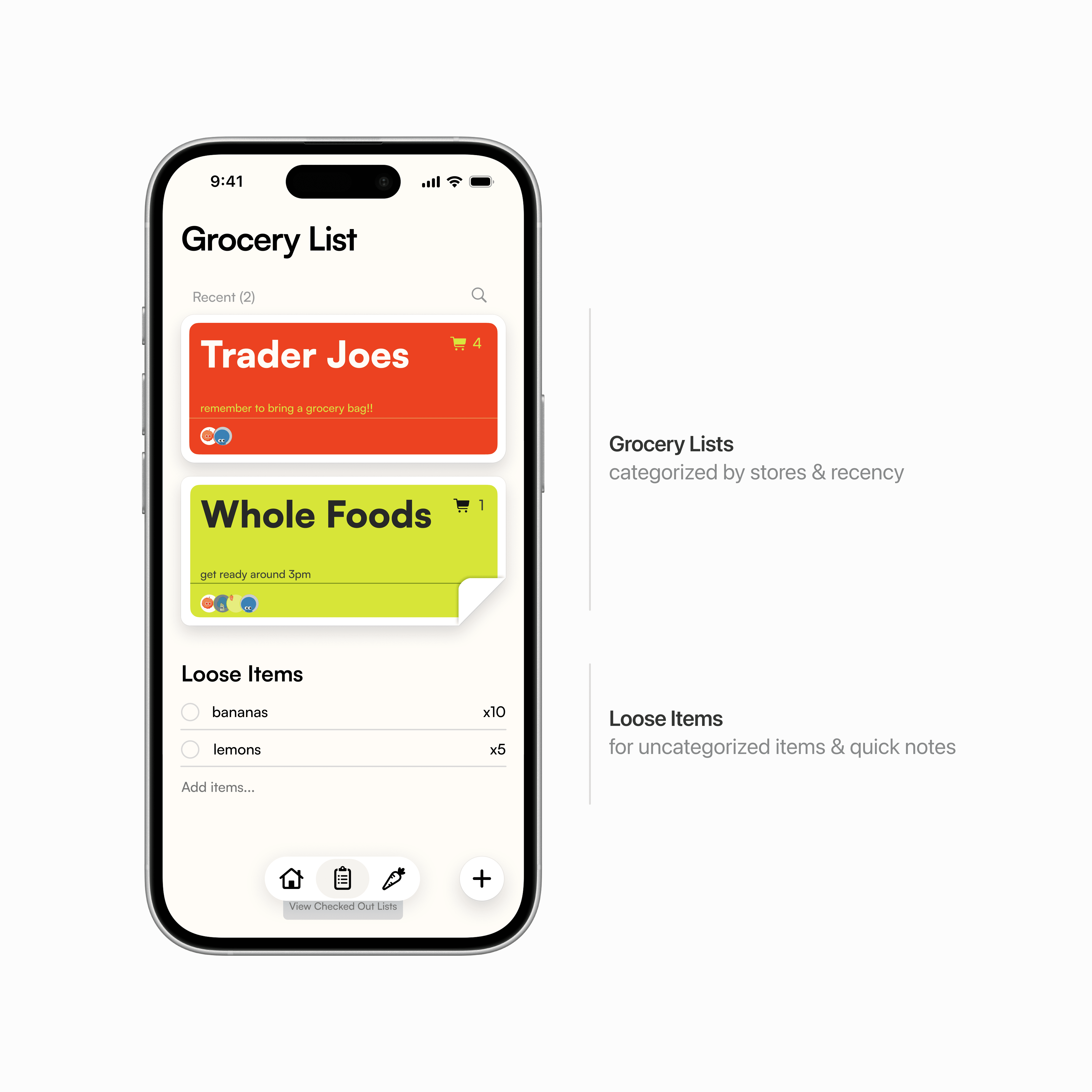
The initial iterations focused purely on utility. I identified four key pillars of information that needed to be visible at a glance:
Store Identity
Notes
Inventory Status
Sharing Status
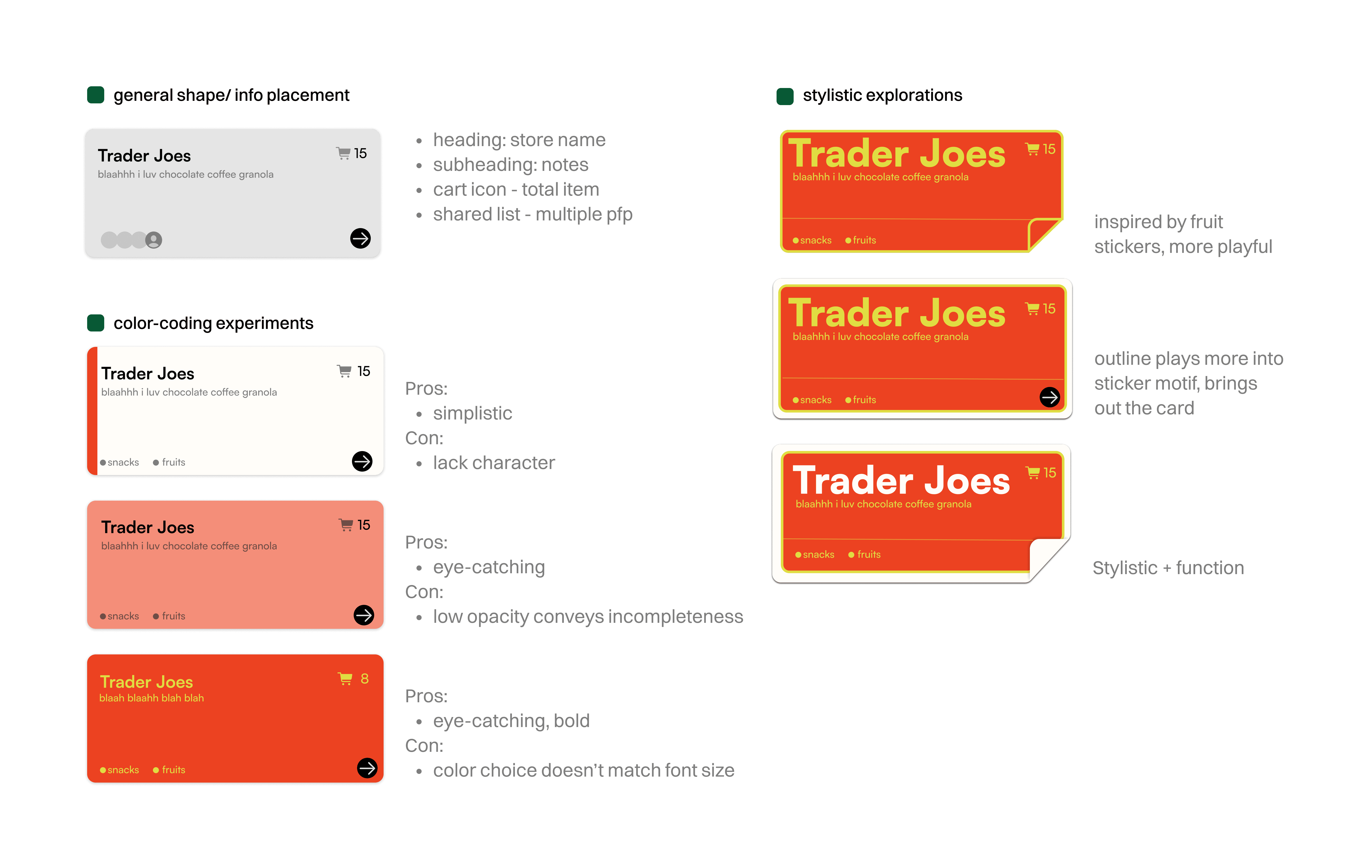
To bridge the gap between "bold color" and "readability," I looked for inspiration within the grocery store itself. I landed on the fruit sticker to use high-saturation colors in a way that felt intentional rather than overwhelming.
Data Visualizations
Existing inventory views make it easy to check single items, but fail to show the bigger picture of stock and expiration. One of our research participants claimed,
I want a high-level visual summary that highlights key categories and expiring categories without scanning every item.
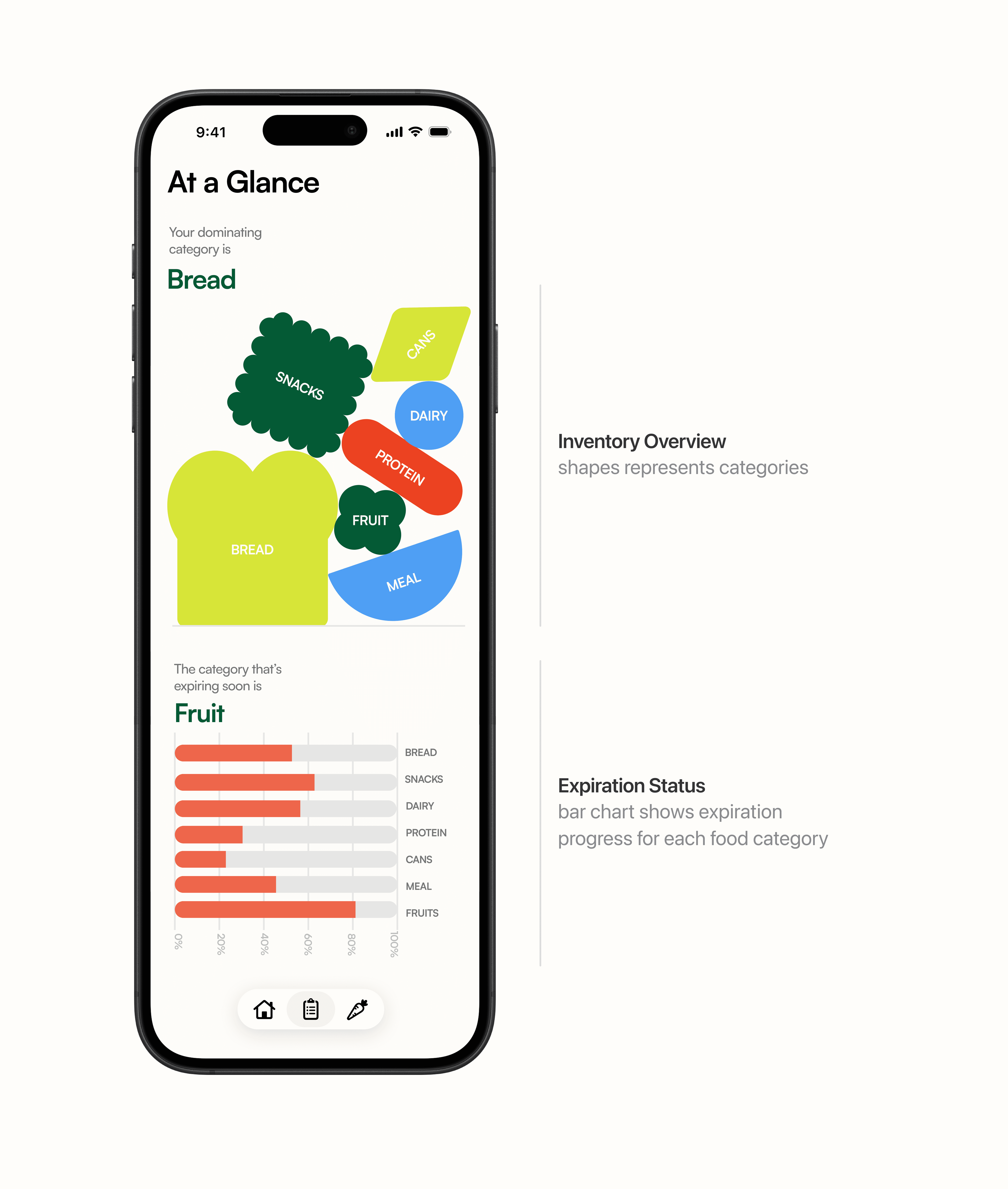
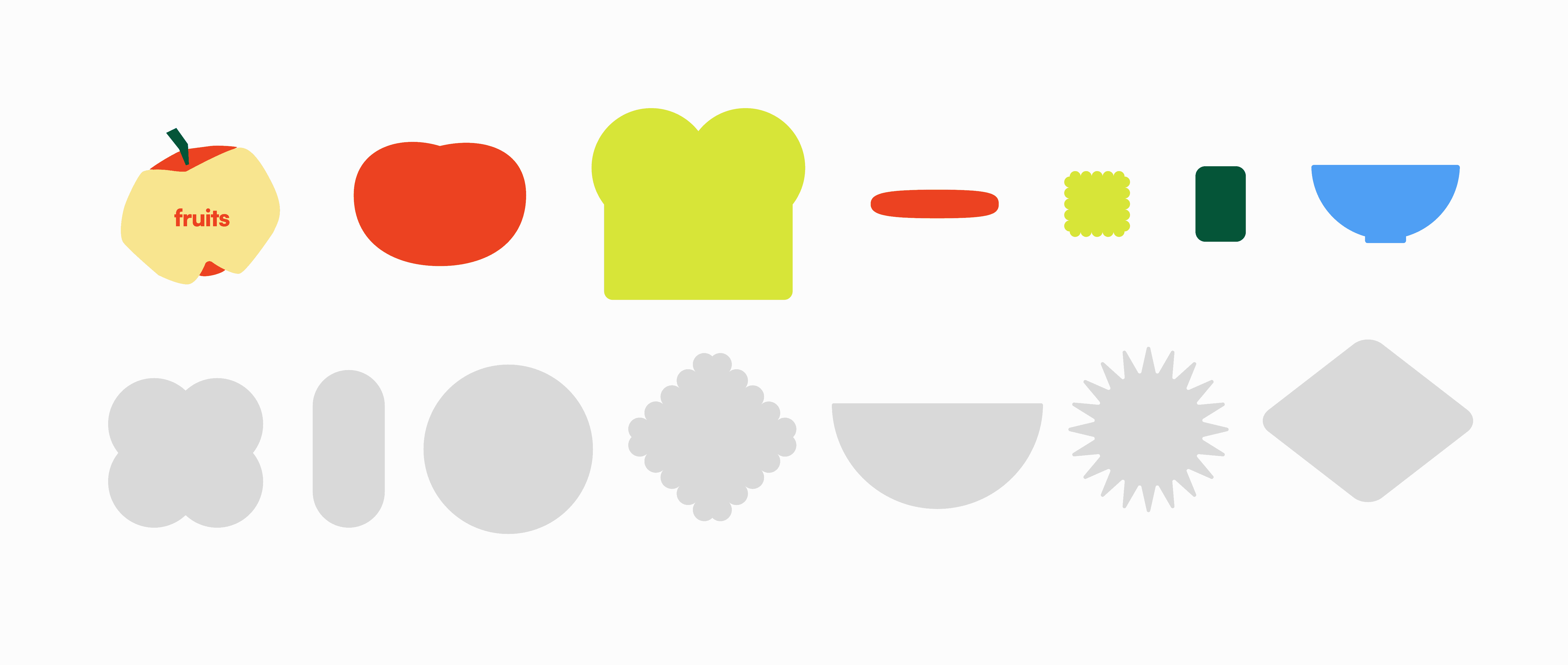
I explored representational, abstract, and elementary shapes to represent various food categories.
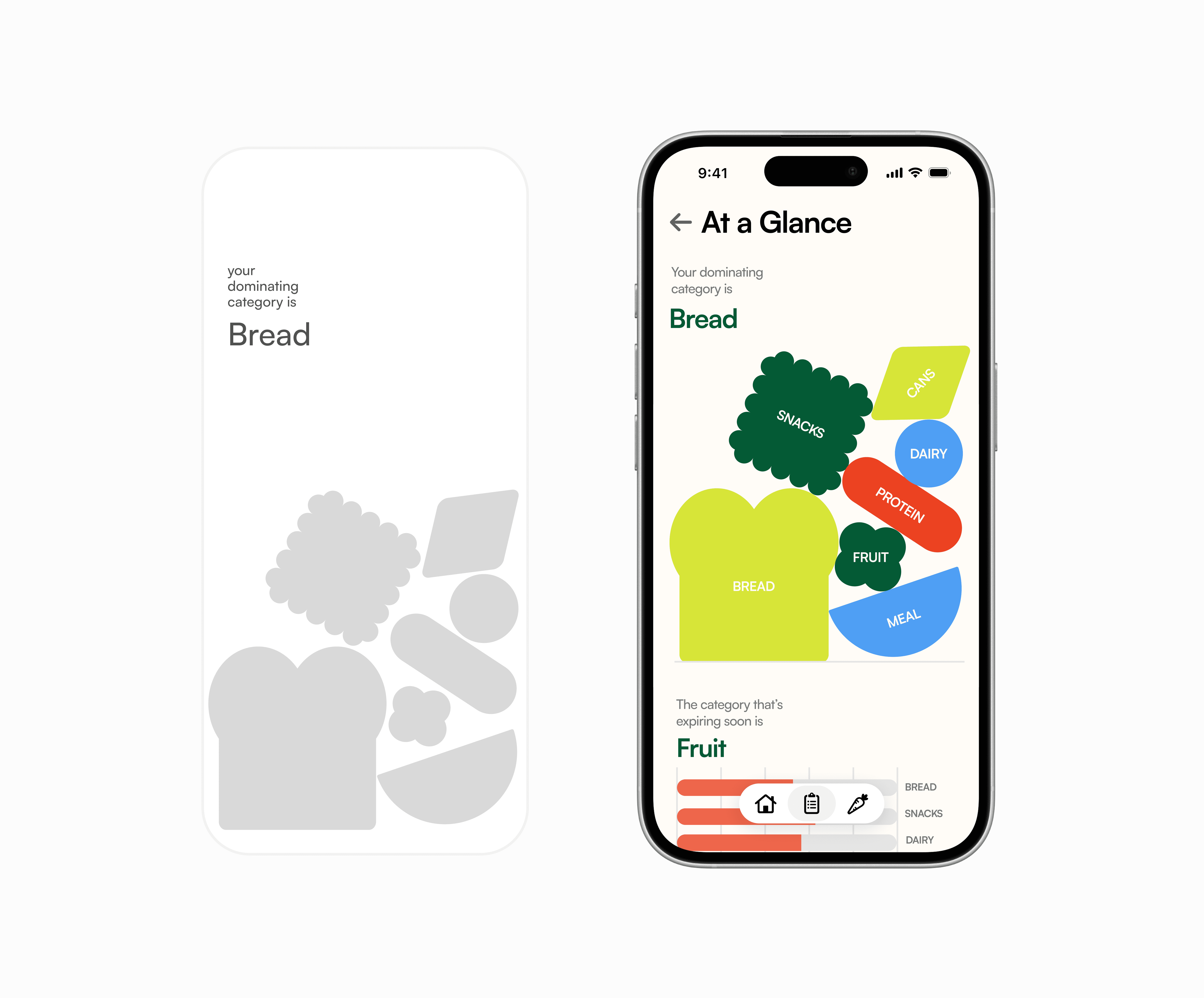
Then, to balance playfulness with clarity, I experimented with various layouts to find the right balance between a "fun" aesthetic and functional data.

I redirected back to the abstracted food-inspired shapes for a more on-brand but also scalable system.
Check out my process & prototypes in this Figma file!
Design Explorations
Shop List Visual Designs
The shop function started as my personal frustration with documenting loose grocery lists into the notes app every time I go shopping. Although it was quick, there was no way of organizing the items, which led to a collection of messy lists and loose items that often caused confusion.
My design principles for this section are:
Prioritize on-the-go usage
incorporating core organizational methods

Store Card Iterations
The initial iterations focused purely on utility. I identified four key pillars of information that needed to be visible at a glance:
Store Identity
Notes
Inventory Status
Sharing Status

To bridge the gap between "bold color" and "readability," I looked for inspiration within the grocery store itself. I landed on the fruit sticker to use high-saturation colors in a way that felt intentional rather than overwhelming.
Data Visualizations
Existing inventory views make it easy to check single items, but fail to show the bigger picture of stock and expiration. One of our research participants claimed,
I want a high-level visual summary that highlights key categories and expiring categories without scanning every item.

I explored representational, abstract, and elementary shapes to represent various food categories.

Then, to balance playfulness with clarity, I experimented with various layouts to find the right balance between a "fun" aesthetic and functional data.

I redirected back to the abstracted food-inspired shapes for a more on-brand but also scalable system.

Check out my process & prototypes in this Figma file!
Design Explorations
Shop List Visual Designs
The shop function started as my personal frustration with documenting loose grocery lists into the notes app every time I go shopping. Although it was quick, there was no way of organizing the items, which led to a collection of messy lists and loose items that often caused confusion.
My design principles for this section are:
Prioritize on-the-go usage
incorporating core organizational methods

Store Card Iterations
The initial iterations focused purely on utility. I identified four key pillars of information that needed to be visible at a glance:
Store Identity
Notes
Inventory Status
Sharing Status

To bridge the gap between "bold color" and "readability," I looked for inspiration within the grocery store itself. I landed on the fruit sticker to use high-saturation colors in a way that felt intentional rather than overwhelming.
Data Visualizations
Existing inventory views make it easy to check single items, but fail to show the bigger picture of stock and expiration. One of our research participants claimed,
I want a high-level visual summary that highlights key categories and expiring categories without scanning every item.

I explored representational, abstract, and elementary shapes to represent various food categories.

Then, to balance playfulness with clarity, I experimented with various layouts to find the right balance between a "fun" aesthetic and functional data.

I redirected back to the abstracted food-inspired shapes for a more on-brand but also scalable system.

Check out my process & prototypes in this Figma file!
Next Steps
While TOM remains a concept idea, we want to understand and quantify how it could perform in real life. The next phase will focus on structured user testing and data-informed interactions.
Next Steps
While TOM remains a concept idea, we want to understand and quantify how it could perform in real life. The next phase will focus on structured user testing and data-informed interactions.
Next Steps
While TOM remains a concept idea, we want to understand and quantify how it could perform in real life. The next phase will focus on structured user testing and data-informed interactions.